Stamp strategy
Where: Settings → General settings → Features settings → Stamp strategy. One dropdown. It is club-wide and applies to every punch card you run.
The question it answers: when a customer buys the punch-card item at a discount, does it still earn a punch?
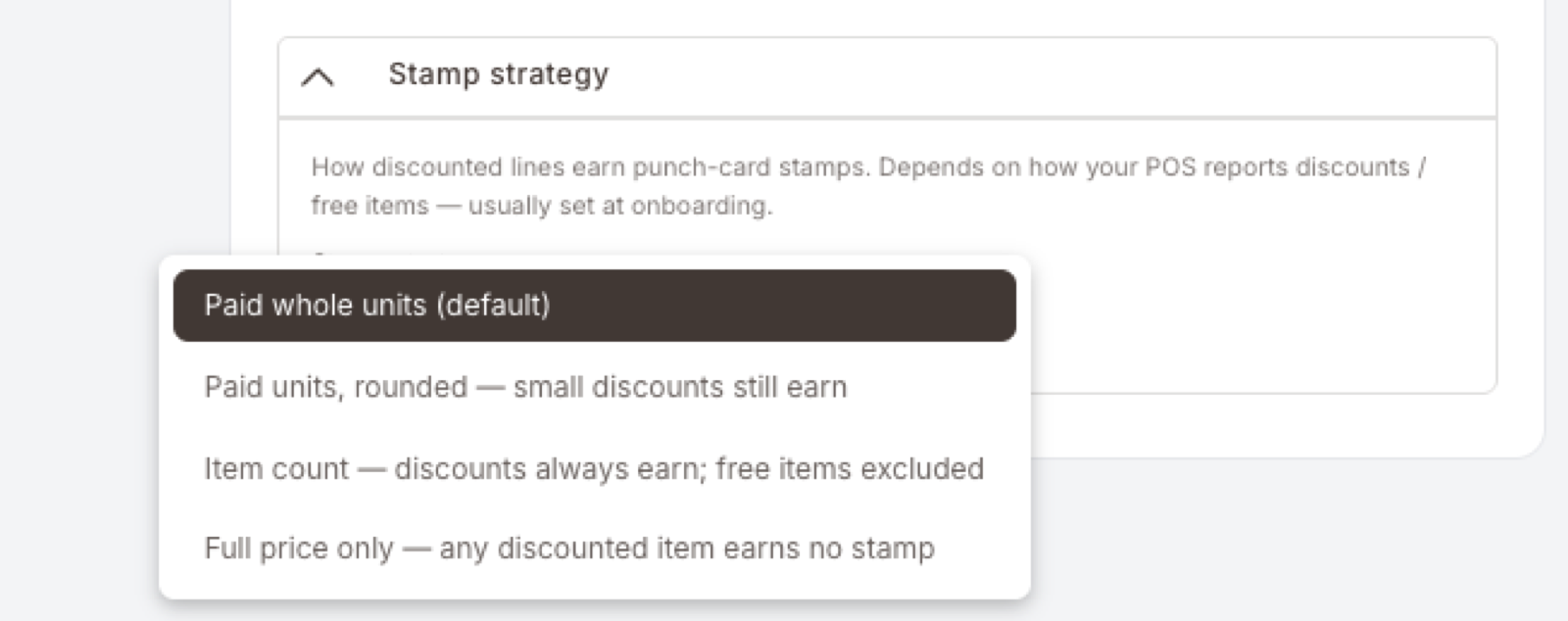
The four options, strictest to most generous: Full price only (a discount of any size earns nothing) → Paid whole units (the default — earns on the money actually paid) → Paid units, rounded (anything down to half price still earns) → Item count (everything earns except free items).
If you never discount the punch-card item, all four behave identically. Leave the default alone.
A free item never earns a punch under any of the four options — as long as your POS sends it as its own zero-price line.
The panel calls each fill a stamp. Everywhere else in the Hub — the Punch card wizard, the Punch a punch card action, the reports — the same thing is called a punch. They are the same thing. This page says punch from here on.
The problem this setting solves
A punch card is simple when nobody discounts anything: one coffee bought, one punch earned. It stops being simple the moment a coffee is sold at a discount, comes free with something else, or is comped by a manager.
Someone has to decide whether that coffee still counts. Stamp strategy is where you make that decision, once, for the whole club.
The four options
They sit on a single scale — how forgiving the card is about discounts.
Full price only — strictest. The item must be paid for at its normal price. Any discount at all, however small, and it earns nothing.
Paid whole units — the default, and what every club runs today. Take what the customer actually paid for that product on one line of the check and divide it by the item's normal price. Every whole item's worth of money earns one punch; the leftover is dropped when the line ends. Pay for 1.8 coffees on one line and you have paid for one whole coffee, so you get one punch.
Paid units, rounded — the same per-line sum, but rounded to the nearest whole item instead of always rounding down. In practice, on a line holding one item: pay at least half price and it still counts. Pay less than half and it doesn't.
Item count — most generous. Ignores the money and counts the items. Everything that leaves the counter earns a punch, no matter how deep the discount. The only exception is an item that is genuinely free.
What that looks like on a real check
A €3.00 coffee, on a card that punches for coffees.
| What's on the check | Full price only | Paid whole units (default) | Paid units, rounded | Item count |
|---|---|---|---|---|
| 1 coffee, no discount — pays €3.00 | 1 | 1 | 1 | 1 |
| 1 coffee, 10% off — pays €2.70 | 0 | 0 | 1 | 1 |
| 1 coffee, 50% off — pays €1.50 | 0 | 0 | 1 | 1 |
| 1 coffee, 60% off — pays €1.20 | 0 | 0 | 0 | 1 |
| 1 coffee, free — pays €0.00 | 0 | 0 | 0 | 0 |
| 2 coffees on one line, 10% off — pays €5.40 | 0 | 1 | 2 | 2 |
| 2 coffees on one line, 50% off — pays €3.00 | 0 | 1 | 1 | 2 |
| 2 coffees on two lines, 50% off each — pays €3.00 | 0 | 0 | 2 | 2 |
Read the last two rows together. Same two coffees, same €3.00 paid, same customer — and two of the four options change their answer depending on nothing more than how the POS chose to write the check. That is not a bug, and it is the reason there are four options instead of one.
Choosing one
Start with one question: do you ever discount the punch-card item? Promotions, happy hour, staff discounts, manager comps, buy-one-get-one, a Deal from your own program — all of it counts.
If the honest answer is no, essentially never, then all four options behave identically for you. Leave the default and spend your time elsewhere.
If the answer is yes, pick by what you would want to tell a customer standing at the counter:
| What you'd want to say | Option |
|---|---|
| "The card rewards full-price purchases. Promo coffees don't count." | Full price only |
| "You earn on what you actually spend. A half-price coffee is half a coffee." | Paid whole units (default) |
| "A small discount won't cost you your punch. A deep promo will." | Paid units, rounded |
| "Every coffee counts. Except the free ones, obviously." | Item count |
Typical fits by business type
- A café or QSR that rarely discounts the item. Keep the default. Nothing to gain from changing it.
- A business built on promotions — frequent offers, buy-one-get-one, generous staff comps — that wants the card to feel simple and generous. Item count. It is also the option least disturbed by POS quirks, which matters more the more discounting you do.
- A margin-sensitive business where the card exists to reward full-price loyalty. Full price only. Be deliberate: this is strict, and customers will notice when a promo purchase earns nothing.
- A business running small everyday discounts (a 10% loyalty discount, a staff 15%) but not deep promos. Paid units, rounded — but check the POS behaviour below first, because this is the option most exposed to it.
Why your POS changes the answer
How lines and discounts arrive from the till, and which options are sensitive to it
The Hub does not watch the counter. It reads the check exactly as the POS writes it — line by line, each line carrying a quantity, a normal price, and what was actually paid after discount.
POS systems disagree about how to write the same purchase. Two coffees might arrive as one line reading "2 × coffee, 10% off", or as two separate coffee lines each 10% off. Both are correct. Both describe the same transaction. They can still produce different punch counts.
How exposed each option is, worst to best:
- Paid units, rounded — most exposed. Each line is rounded on its own, and a half rounds up. Two coffees at half price on one line come to exactly one item's worth and round to one punch; the same two coffees on separate lines are half an item each, round up twice, and earn two. This is the option's known weak spot — pick it only once you know how your POS groups items.
- Full price only — a discount anywhere on a grouped line disqualifies everything on that line, including items that weren't the reason for the discount.
- Paid whole units — exposed in the opposite direction. Fractions pool within a line but are dropped at the line boundary, so splitting a check into more lines can earn fewer punches, never more.
- Item count — barely exposed. Quantity is quantity, however the lines are grouped. The one thing it needs is for a free item to arrive on its own zero-price line.
If you don't know which format your checks use, your integrator does. It is a one-question answer and it is worth asking before you change this setting.
Free items and buy-one-get-one
This is the case that trips people up, so it is worth being exact.
A genuinely free item earns nothing under all four options — provided the POS sends it as its own line at €0.00. Nobody has to configure anything for this; it falls out of all four rules. Item count excludes zero-price lines explicitly; the other three have no money to count.
The risk is buy-one-get-one, because some POS systems don't write it as a free line at all. They write "2 × coffee, 50% off" — one line, no zero, the discount spread across both coffees. From the Hub's side there is no free item to exclude, only a discounted pair. So:
- Item count gives 2 punches — the free coffee earns one.
- Paid whole units and Paid units, rounded give 1 — the money only ever covered one coffee.
- Full price only gives 0.
If you run buy-one-get-one on the punch-card item and you don't want the free one earning a punch, avoid Item count — or ask your integrator whether the POS can send the free item on its own zero-price line, which fixes it cleanly and keeps the generous behaviour everywhere else.
Changing the setting
Open Settings → General settings, expand Stamp strategy in the Features settings card, pick the option, and click Save at the bottom-right of the page.
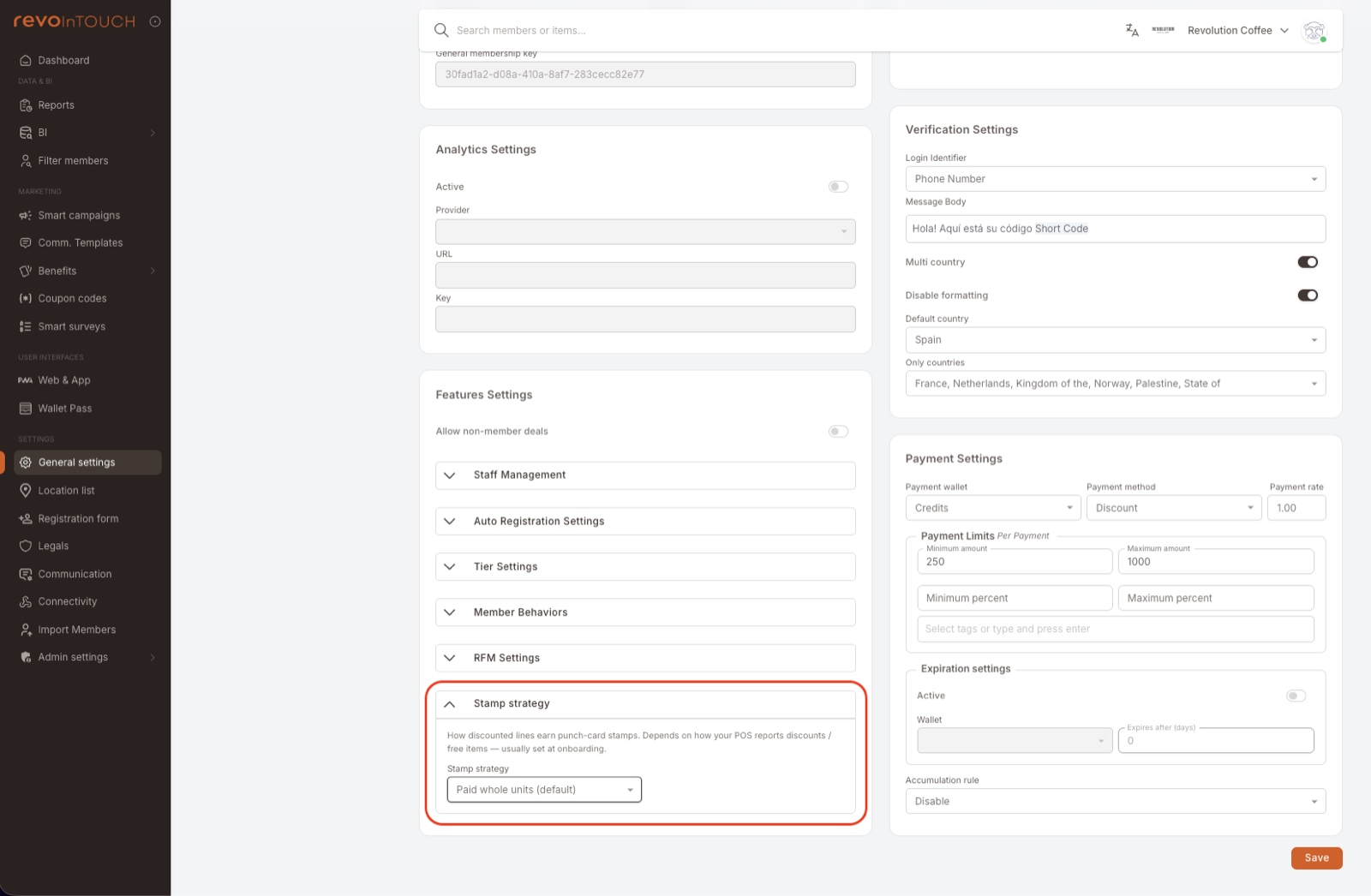
The change applies from the moment you save, to checks that arrive afterwards. Punches already sitting on members' cards are untouched — nothing is recalculated backwards.
Gotchas
5 things to watch for
-
It is one setting for the whole club, not a per-card option. Every punch card you run — coffees, burgers, car washes — uses the same strategy. If two cards would want different treatment, this setting can't give it to them; you would need to solve it in the Rule conditions instead.
-
Leftovers don't carry to the next visit. On the two money-based options each check is settled on its own, and nothing is banked toward the next one. On the default, a customer who pays for 1.8 coffees gets one punch and the remaining 0.8 is dropped, so three such visits earn three punches rather than five.
-
Your own program's discounts are discounts too. A Deal that takes 20% off coffees makes every coffee on that check a discounted coffee. Under Full price only that would mean no punches at all on any check where the Deal fired. If you run a Deal and a punch card on the same item, confirm the interaction with your integrator before choosing a strict option.
-
The panel wording describes the mechanism, not the outcome. "Paid units, rounded — small discounts still earn" is accurate but doesn't say where the line falls. On a line holding a single item it falls at half price: 50% off still earns, 51% off does not. On a line holding several items the sum is done on the line total, so the threshold moves — read the table rather than the label.
-
This is normally set at onboarding and left alone. The right choice depends on how your POS reports discounts, which is not something the panel can tell you. If you are considering a change and you are not certain which way your POS writes discounted lines, ask before you save rather than after.
Related
- Author a Punch card — building the card itself: artwork, total punches, the reward.
- Rule: Punch card — the playbook that wires "buy 8, get the 9th free" end to end.
- General settings — the rest of the Features settings card.